最適なAI写真修復は、強く加工することではありません。古い家族写真では、まず損傷の種類を見分け、必要最小限の修復を行い、元のスキャンと比べることが大切です。
要点:先に清掃とスキャン、次に傷や汚れを修復し、顔の補正は控えめに、カラー化は清掃後、最後に本人らしさを確認します。
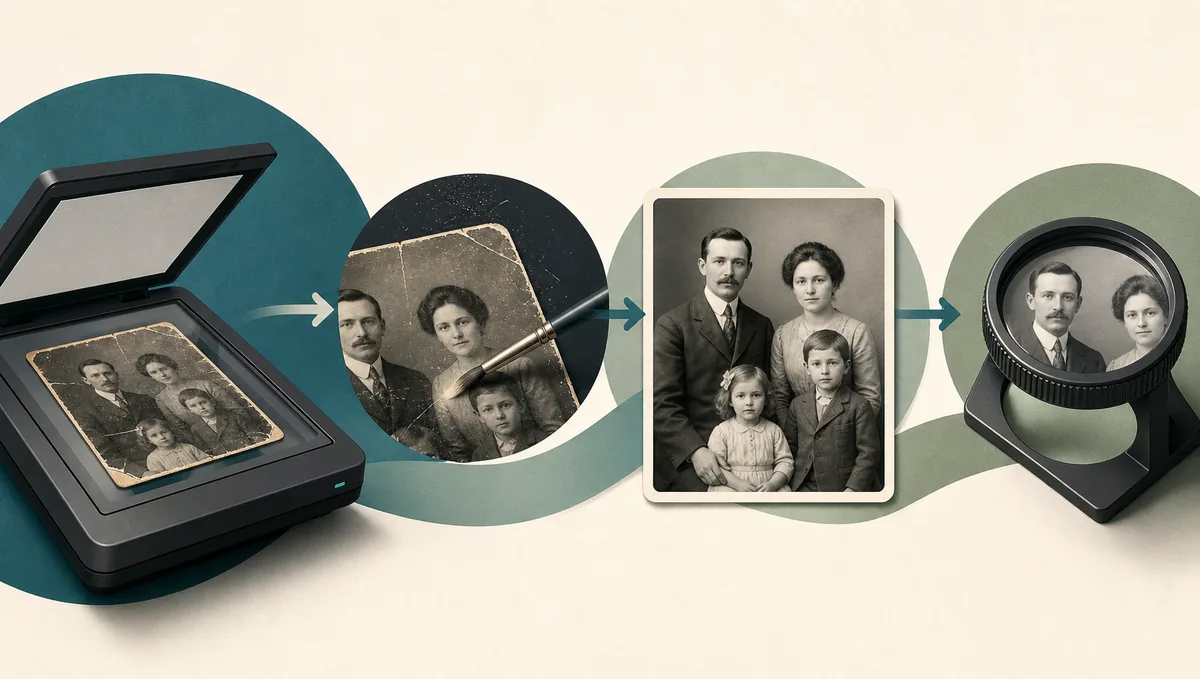
この記事の内容
まず使うべきAIテクニック
最適なAI写真修復は、強く加工することではありません。古い家族写真では、まず損傷の種類を見分け、必要最小限の修復を行い、元のスキャンと比べることが大切です。
損傷の種類で最初の手法を選ぶ
| 問題 | 最初の手法 | 順番が大切な理由 | 次の確認 |
|---|---|---|---|
| 細い傷や折れ線 | 傷除去と損傷クリーニング | 先にシャープ化やカラー化をすると線が強調されます | 補正前に100%表示で確認 |
| 柔らかいスキャンや低コントラストの肖像 | 控えめな強調とコントラスト回復 | 別人にせず読みやすさを高めます | 目、口、髪型、服を比較 |
| 欠け、破れ、染み | インペイント系修復または手作業 | 周辺の文脈が自然な修復を助けます | 未編集スキャンを保存 |
| きれいな白黒写真 | 清掃後のカラー化 | 傷や染みを除くと色推定が安定します | 色は推定として扱う |
安全な手法は、見える問題を解く最小限の修復です。
要点:先に清掃とスキャン、次に傷や汚れを修復し、顔の補正は控えめに、カラー化は清掃後、最後に本人らしさを確認します。
AI写真修復テクニック早見表
AI写真修復は、物理的な損傷と画質の問題を分けると判断しやすくなります。傷、破れ、染み、欠けは、ぼけや低コントラストとは別の処理が必要です。
| Technique | Use it for | Avoid it when | Good internal match |
|---|---|---|---|
| Scratch and dust removal | Surface lines, dust, fold marks, small cracks | The print has not been safely digitized | Remove scratches from photos |
| Face restoration | Soft but recognizable eyes, mouth, and skin detail | The face is mostly missing or identity is uncertain | Old photo enhancer |
| Deblur and upscaling | Camera shake, low-resolution scans, small prints | Scratches and dust are still visible | Unblur photos |
| Colorization | Clean black-and-white portraits or scenes | Historically exact color matters | Colorize old photos |
| Damage repair / inpainting | Missing corners, tears, stains, torn backgrounds | The missing area contains critical unknown text or faces | Repair damaged photos |
Choose the method by damage type, not by the most impressive preview.
安全な修復順序
信頼できる流れは、見た目より先に元の記録を守ります。未編集スキャンを保存し、作業はコピーで行います。
- 危険な清掃の前に高品質なスキャンや撮影コピーを作る。
- シャープ化、拡大、カラー化の前にほこりと傷を除く。
- 破れ、染み、欠けを周囲の文脈を保って修復する。
- 顔補正は主要な損傷を直した後に控えめに使う。
- コントラスト、色、トーンは最後に調整し100%表示で比較する。
この順番は、きれいでも間違ったAI出力を防ぎます。
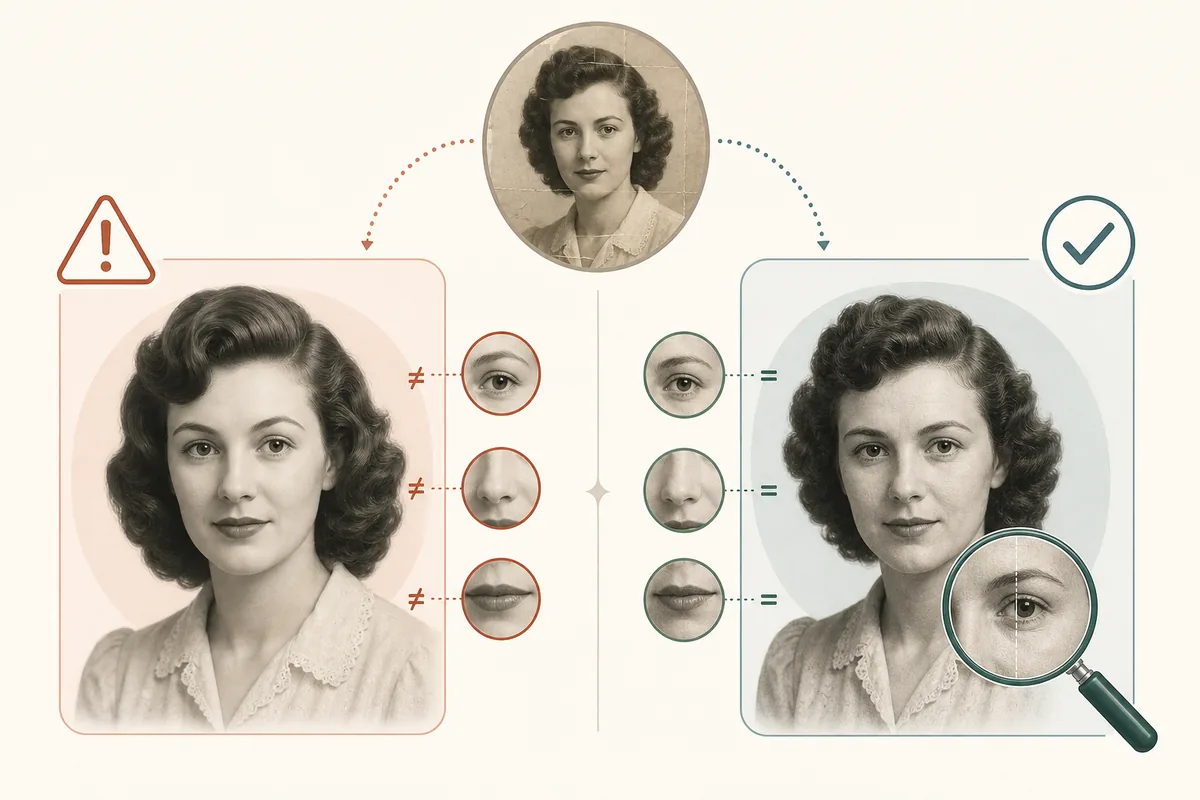
本人らしさと歴史的な細部を守る方法
もっとも重要なのは本人らしさの保持です。鮮明でも、元の人物に見えなければよい修復ではありません。
ダウンロード前の確認リスト:
- 表情と年齢感は元写真と合うか。
- 勲章、ボタン、手書き、家具などが消えていないか。
- 修復部分は周囲の粒状感と合うか。
- カラー化の色を事実ではなく推定として扱えるか。
- 家族が説明なしで本人だと分かるか。
系譜、記念、資料用途では、修復版と元スキャンを必ず一緒に保管してください。
オンラインAI、手作業、ローカル環境の使い分け
オンラインAIは一般的な家族写真の素早い修復に向きます。価値が高い写真や曖昧な写真では手作業が安全です。ローカル環境はプライバシーと再現性に役立ちます。
| Situation | Best approach | Reason |
|---|---|---|
| A box of faded family snapshots | Online AI restoration | Fast enough to process many photos and review the best results |
| One irreplaceable wedding portrait | Manual retouching plus conservative AI | Human review protects faces, fabric, jewelry, and background detail |
| Private archive or research collection | Local workflow | Files can stay on your machine and settings can be repeated |
| Prompt-based creative tools | Prompt plus strict identity instructions | Useful for controlled restoration, but review is mandatory |
The best tool depends on risk, privacy, and historical accuracy.
If you are comparing software, test one scratched photo, one faded portrait, one black-and-white photo, and one damaged print.
避けたいAI修復の失敗
失敗の多くは早すぎる強加工から起きます。清掃前のシャープ化、傷修復前のカラー化、強すぎる顔補正は避けましょう。
Avoid these common mistakes:
- Uploading the only copy instead of a duplicate file
- Using the strongest face or beauty setting by default
- Cropping away damaged borders before repair
- Treating AI colorization as historically confirmed color
- Skipping the 100% zoom comparison before printing
- Deleting the original scan after the restored image looks good
目的は古い写真を無理に新品風にすることではなく、本当の記憶を見やすくすることです。
よくある質問
結論:必要最小限のAI補正を使う
AI写真修復は、各工程の役割を分けるほど安定します。物理的な損傷を先に直し、顔補正は控えめに、カラー化は清掃後に行い、元のスキャンを必ず保存してください。

Sarah Mitchell, Lifestyle & Family Heritage Writer
Sarah writes practical guides for families digitizing and restoring old photo collections with a conservative, archive-first workflow.