좋은 AI 사진 복원은 가장 강한 보정이 아닙니다. 오래된 가족 사진은 먼저 손상 유형을 보고, 가장 좁은 문제부터 고친 뒤 원본 스캔과 비교해야 합니다.
빠른 답: 먼저 청소하고 스캔한 뒤 스크래치와 얼룩을 제거하고, 얼굴은 조심스럽게 복원하며, 색상화는 정리 후에 하고 마지막에 충실도를 확인하세요.
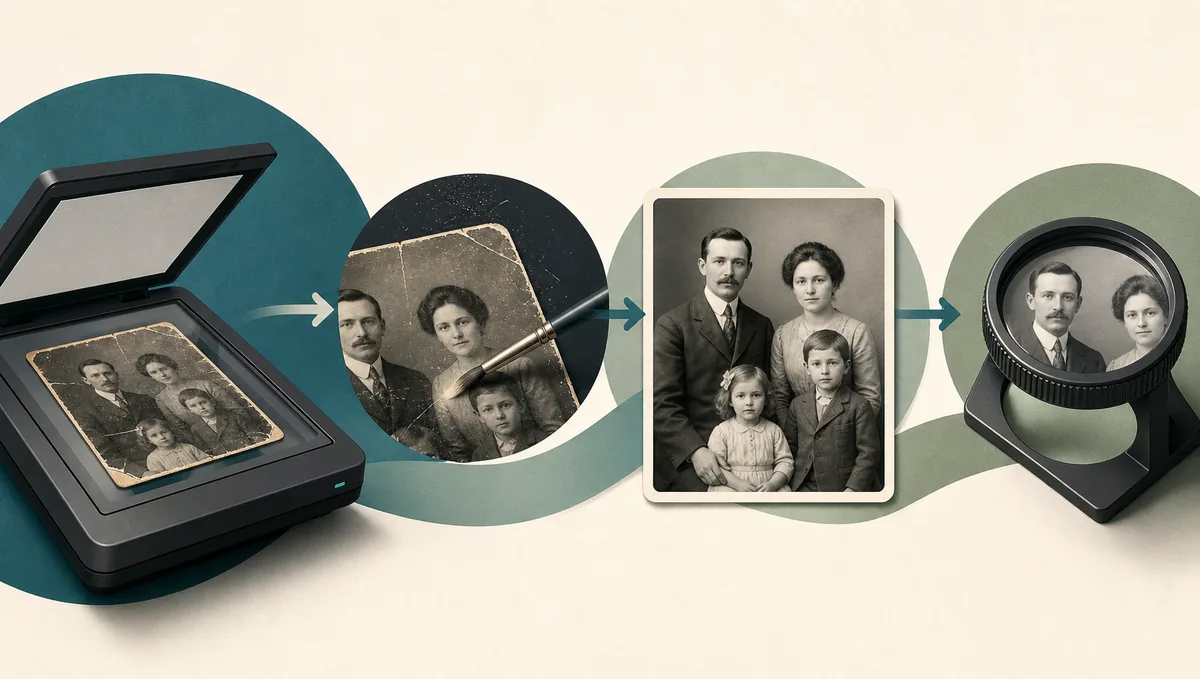
이 글의 내용
빠른 답: 어떤 AI 기법을 먼저 쓸까
좋은 AI 사진 복원은 가장 강한 보정이 아닙니다. 오래된 가족 사진은 먼저 손상 유형을 보고, 가장 좁은 문제부터 고친 뒤 원본 스캔과 비교해야 합니다.
손상 유형으로 첫 기법 선택
| 문제 | 첫 기법 | 순서가 중요한 이유 | 다음 단계 |
|---|---|---|---|
| 얇은 스크래치나 접힌 선 | 스크래치 제거와 손상 정리 | 선명화나 색상화를 먼저 하면 선이 더 커질 수 있습니다 | 보정 전 100% 확대 확인 |
| 부드러운 스캔 또는 낮은 대비 초상 | 부드러운 향상과 대비 회복 | 새 얼굴을 만들지 않고 가독성을 높입니다 | 눈, 입, 헤어라인, 옷 비교 |
| 빠진 모서리, 찢김, 얼룩 | 인페인팅식 복원 또는 수동 보정 | 주변 맥락이 자연스러운 복원을 돕습니다 | 원본 스캔 보관 |
| 깨끗한 흑백 사진 | 정리 후 색상화 | 스크래치와 얼룩 제거 후 색 예측이 안정적입니다 | 색은 해석으로 보기 |
가장 안전한 기법은 보이는 문제를 해결하는 가장 좁은 수정입니다.
빠른 답: 먼저 청소하고 스캔한 뒤 스크래치와 얼룩을 제거하고, 얼굴은 조심스럽게 복원하며, 색상화는 정리 후에 하고 마지막에 충실도를 확인하세요.
AI 사진 복원 기법 매트릭스
AI 사진 복원은 물리적 손상과 이미지 품질 문제를 나누면 판단하기 쉽습니다.
| Technique | Use it for | Avoid it when | Good internal match |
|---|---|---|---|
| Scratch and dust removal | Surface lines, dust, fold marks, small cracks | The print has not been safely digitized | Remove scratches from photos |
| Face restoration | Soft but recognizable eyes, mouth, and skin detail | The face is mostly missing or identity is uncertain | Old photo enhancer |
| Deblur and upscaling | Camera shake, low-resolution scans, small prints | Scratches and dust are still visible | Unblur photos |
| Colorization | Clean black-and-white portraits or scenes | Historically exact color matters | Colorize old photos |
| Damage repair / inpainting | Missing corners, tears, stains, torn backgrounds | The missing area contains critical unknown text or faces | Repair damaged photos |
Choose the method by damage type, not by the most impressive preview.
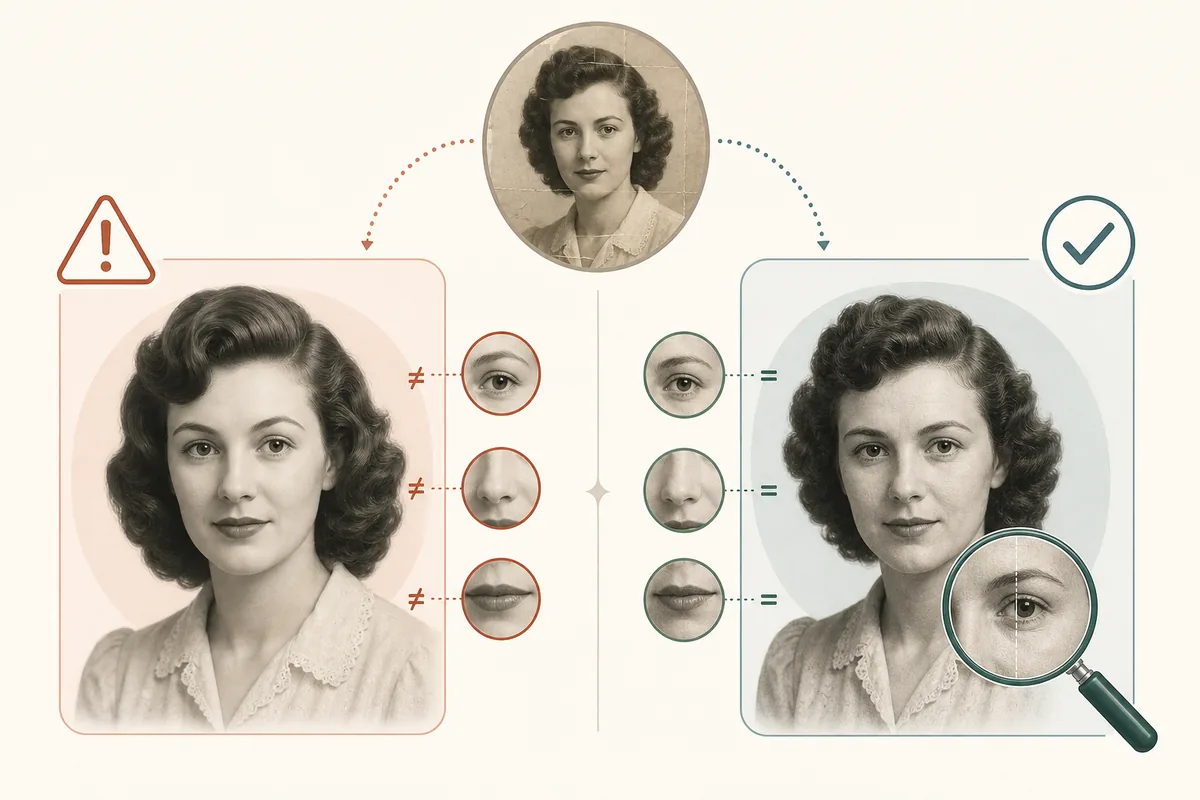
오래된 사진을 위한 가장 안전한 순서
신뢰할 수 있는 흐름은 원본 기록을 먼저 보호합니다. 손대지 않은 스캔을 보관하고 사본에서 작업하세요.
- 고품질 스캔 또는 촬영 사본을 만듭니다.
- 선명화, 확대, 색상화 전에 먼지와 스크래치를 제거합니다.
- 주변 맥락을 보존하며 찢김, 얼룩, 누락 영역을 복원합니다.
- 얼굴 복원은 주요 손상이 사라진 뒤 보수적으로 사용합니다.
- 대비, 톤, 색은 마지막에 조정하고 100% 확대 비교합니다.
이 순서는 보기 좋지만 틀린 결과를 줄입니다.
정체성과 역사적 디테일 보존 방법
가장 중요한 품질 검사는 정체성 보존입니다.
다운로드 전 충실도 체크:
- 표정과 나이가 원본과 맞나요?
- 중요한 세부가 사라지지 않았나요?
- 복원 영역이 주변 입자감과 어울리나요?
- 색상은 추정으로 이해되나요?
- 가족이 설명 없이 알아볼 수 있나요?
가계, 추모, 보관 목적이라면 복원 파일과 원본 스캔을 함께 보관하세요.
온라인 AI, 수동 편집, 로컬 워크플로 선택
온라인 AI는 일반 손상을 빠르게 정리할 때 좋습니다. 소중하거나 애매한 사진은 수동 보정이 안전합니다. 로컬 흐름은 개인정보와 반복성에 도움이 됩니다.
| Situation | Best approach | Reason |
|---|---|---|
| A box of faded family snapshots | Online AI restoration | Fast enough to process many photos and review the best results |
| One irreplaceable wedding portrait | Manual retouching plus conservative AI | Human review protects faces, fabric, jewelry, and background detail |
| Private archive or research collection | Local workflow | Files can stay on your machine and settings can be repeated |
| Prompt-based creative tools | Prompt plus strict identity instructions | Useful for controlled restoration, but review is mandatory |
The best tool depends on risk, privacy, and historical accuracy.
If you are comparing software, test one scratched photo, one faded portrait, one black-and-white photo, and one damaged print.
피해야 할 AI 복원 실수
대부분의 실패는 너무 일찍 과한 보정을 해서 생깁니다.
Avoid these common mistakes:
- Uploading the only copy instead of a duplicate file
- Using the strongest face or beauty setting by default
- Cropping away damaged borders before repair
- Treating AI colorization as historically confirmed color
- Skipping the 100% zoom comparison before printing
- Deleting the original scan after the restored image looks good
목표는 새 사진처럼 만드는 것이 아니라 실제 기억을 더 잘 보이게 하는 것입니다.
자주 묻는 질문
결론: 필요한 만큼만 AI로 고치기
AI 사진 복원은 각 기법의 역할이 분명할 때 가장 안정적입니다. 물리적 손상을 먼저 고치고, 얼굴은 보수적으로 복원하며, 색상화는 정리 후에 하고 원본 스캔을 보관하세요.
Sarah Mitchell, Lifestyle & Family Heritage Writer
Sarah writes practical guides for families digitizing and restoring old photo collections with a conservative, archive-first workflow.